Optimize Your Website for Conversions with

Zoho Analytics logo featuring a stylized graph and upward arrow inside a triangle, symbolizing data analytics, followed by the text "Zoho Analytics" on a transparent background.

Enhance your website’s performance with data-driven insights using Zoho Analytics. This powerful tool empowers businesses to track visitor behavior, leverage AI for advanced analysis, and visually interpret data—all seamlessly integrated within Zoho One at no additional cost.

8%

profit increase reported by organizations leveraging big data analytics

Source: BARC Research

62%

of companies report that information and data analytics gives them a competitive advantage

Source: Keboola

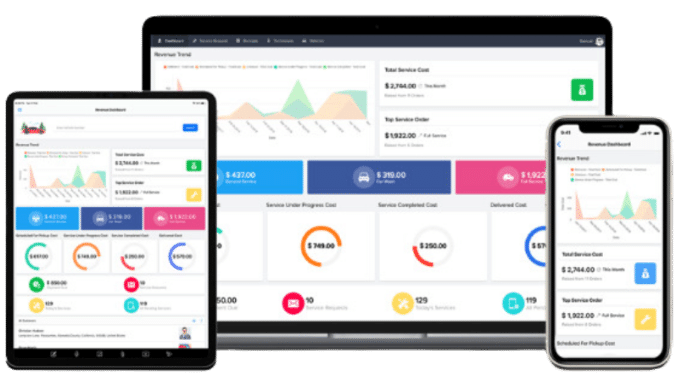
Preview of zoho dashboards

Try Zoho today!

Sign Up for a Free Zoho Account! Then Contact Us to Learn More!

Functionality and Benefits

Data Integration: Connect and Blend Data from Anywhere

Unify data from spreadsheets, cloud applications, databases, and third-party tools to gain a comprehensive view of your business performance. Zoho Analytics makes it easy to clean, combine, and prepare your data for deeper analysis.

Example: A marketing agency integrates data from Google Ads, Facebook, and HubSpot. By viewing everything in one dashboard, they identify the most cost-effective channels and reallocate budget for better ROI.

AI Insights: Augment Your Analysis with AI

Use Zia, Zoho’s smart AI assistant, to automatically generate insights, forecast trends, and detect anomalies in your data. Let AI surface patterns and suggestions that help guide your business decisions.

Example: A SaaS company uses Zia to spot an unexpected drop in user engagement. The anomaly detection points to a recent product update, helping the team take quick action to resolve the issue.

Visual Dashboards: Visually Analyze Your Data

Create custom dashboards with charts, graphs, and KPI widgets to easily interpret data and communicate insights across teams. Zoho’s drag-and-drop interface allows anyone to build stunning visual reports without technical expertise.

Example: A retail brand builds a sales dashboard tracking product performance across locations. The visual layout helps the team identify top sellers and underperforming regions, leading to smarter inventory planning.

Zoho Analytics Data Connectors

Seamlessly integrate Zoho Analytics with other Zoho apps and third-party tools to enhance functionality.


and many more!

Person scrolling on a tablet
Five people in business attire collaborate at a table with laptops, tablets, and documents displaying charts and graphs, leveraging data analytics and business intelligence tools to drive insights.

Frequently Asked Questions

Zoho Analytics is a self-service BI and data analytics platform that enables users to create insightful reports and dashboards from various data sources—without needing coding knowledge. It’s built for anyone who wants to turn raw data into clear visualizations.

Zoho Analytics is designed for teams across departments—sales, marketing, finance, operations, HR, and more. Whether you’re a small business owner or an enterprise analyst, it provides powerful reporting tools for data-driven decision-making.

While spreadsheets are great for simple calculations, Zoho Analytics is built for scalable reporting, visualization, and collaboration. It handles large datasets, offers drag-and-drop report building, and supports automated updates and AI insights.

You can build bar charts, pie charts, pivot tables, heat maps, summary views, KPI widgets, and more. Reports can be shared, scheduled, and embedded to fit your workflow.

Yes. Dashboards allow you to combine multiple reports into a single, interactive view. Using the drag-and-drop interface, you can build dashboards in minutes that highlight your key metrics and business health at a glance.

Yes. Zoho follows industry-standard practices for data security, privacy, and compliance (including GDPR and SOC 2).

Absolutely. You can share dashboards and reports with specific roles, assign permissions, and comment within reports to collaborate efficiently with your team.

Yes, Zoho Analytics offers a mobile app for iOS and Android, allowing users to view, interact with, and share reports and dashboards on the go.

If you exceed your plan’s limits, Zoho will notify you. You can choose to upgrade your plan, purchase add-ons, or manage your usage by archiving older data.

Optimize Your Business Decisions with Data

Get Started with Zoho Analytics Today

Whether you’re aiming to uncover insights, track key performance metrics, or make data-driven decisions with confidence, our team is here to help you harness the full power of Zoho Analytics. Contact us today to schedule a call!

Person using a laptop displaying data analytics dashboards with charts, graphs, and statistics in a well-lit workspace, discovering how to save money with Zoho One.

So many people were trying to sell me, sell me, sell me. [KDG] was like, ‘What do you need?’…They were great through and through.

Smart City Locating
Quotation mark icon