Case Study

UI/UX Design

Zoho

fpPathfinder: A Leader in Resources

fpPathfinder is a provider of resources designed to help financial advisors and their clients navigate complex planning conversations. Financial advisors loved fpPathfinder’s powerful planning guides, but there was a problem: they couldn’t find them. Hidden resources, confusing navigation, and clunky search left members frustrated. Together, we redesigned the experience—transforming a maze of information into a simple, intuitive platform. The results? A 10% traffic boost, 1,500 new signups, and happier advisors who finally had the tools they needed at their fingertips.

The fpPATHFINDER logo features four colored squares—navy, green, red, and yellow—above the text “fpPATHFINDER” on a white background, reflecting a modern look similar to popular platforms like Zoho.

Revamped Tools

Key deliverables included a client services calendar, interactive checklist, member section revamp, group membership quoting tool, and a guide wizard. These tools empowered financial professionals to streamline workflows and better serve their clients. 

Data-backed Improvements

The team leveraged analytics tools like HotJar and PageSense to conduct monthly, data-driven reviews. By analyzing user interactions, they identified pain points and areas for improvement, such as the need for a more digestible membership table and better placement of FAQs. 

Actionable Recommendations

Actionable recommendations were provided, including redesigning complex tables for clarity and moving important content higher on pages to increase engagement.

Hard to Find Tools

KDG transformed fpPathfinder’s site from a maze into a guided tour. By focusing on what mattered most—clarity and usability—the team reimagined the experience and delivered tools that are both intuitive and practical.

  • After doubling in size, fpPathfinder’s content library expanded from 18 guides to over 100 in just four years. With such significant growth, they reached out to members for feedback on their current system. What they learned was concerning: confusing navigation, inefficient search functionality, and impossible to find key features. Advisors spent more time looking for resources than serving clients.  

  • fpPathfinder approached KDG with a clear objective: to overhaul the user experience of its website. While their site offered a strong library of resources for financial advisors, members found it difficult to locate and use them effectively. Members often reported challenges in finding specific content due to unintuitive navigational pathways, further hampered by an underperforming search functionality. 

  • Additionally, their existing membership dashboard lacked clear navigation. Key membership features buried under multiple clicks limited visibility and adoption. Poor integration of the educational resources and guide bundles left valuable content underutilized. Members often relied on a general resource page, further diminishing clarity and ease of access. 

With KDG we didn’t just find expertise, we found a true partner who listened, adapted, and worked alongside us to achieve results. When launching a new project based on high Premier member demand, the KDG team went beyond creating a great user experience. They took the time to understand the ‘why’ behind the project and reviewed the member feedback we had gathered to ensure the end results matched the demand. Their thoughtful approach paid off! When we launched, Premier member response was overwhelmingly positive, and that tier now has the highest retention rate.

Stacia Waren
Quotation mark icon

Solutions

Client Services Calendar

The client service calendar enables fpPathfinder to create customized annual calendars of service touchpoints. Their advisors can select from templates, choose the frequency of interactions, and attach relevant guides or notes. Once completed, the tool generates polished PDFs that can be used internally or shared directly with clients. 

Interactive Checklist 

The interactive checklist feature allows advisors to customize their own or use prebuilt versions to guide client conversations with greater clarity and consistency. 

PageSense Data Reviews 

Implementing PageSense provided deeper analytics capabilities such as A/B testing, heatmaps, and session recordings. Membership tier segmentation allowed for a clearer understanding of how different users interacted with the platform. 

Group Membership Quoting Tool

This custom-designed membership quoting tool allows users to input their details, select a membership level, and specify the number of advisors. It instantly generates a price estimate per user and highlights applicable discounts, greatly simplifying the cost quoting process. 

Guide Wizard

Designed to support Advisors in identifying the most suitable guide from among hundreds of available options. The Guide Wizard prompts users with targeted questions regarding their client—such as age-related milestones, upcoming life events, or tax planning requirements—and then recommends the guides that best meet those criteria. Advisors are able to preview, download, and share the selected guides quickly, streamlining their workflow and ensuring confidence in preparation for each client interaction.

Exploring Key Features in Action

A checklist webpage from ABC Financial titled

Allows advisors to customize their checklists to guide client conversations
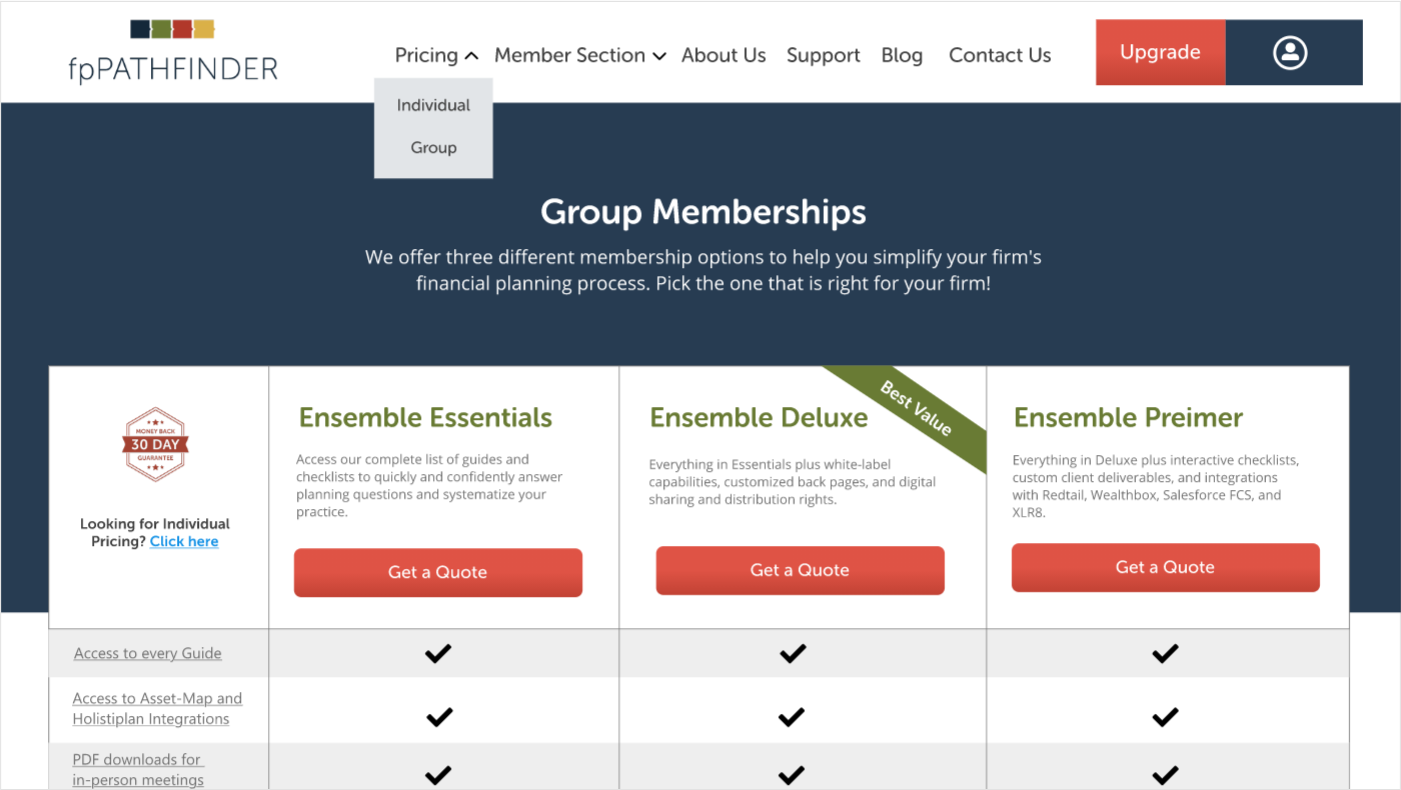
This custom-designed membership quoting tool allows users to input their details, select a membership level, and specify the number of advisors. It instantly generates a price estimate per user and highlights applicable discounts, greatly simplifying the cost quoting process.

This  membership quoting tool allows users to input their details and it instantly generates a price estimate per user.
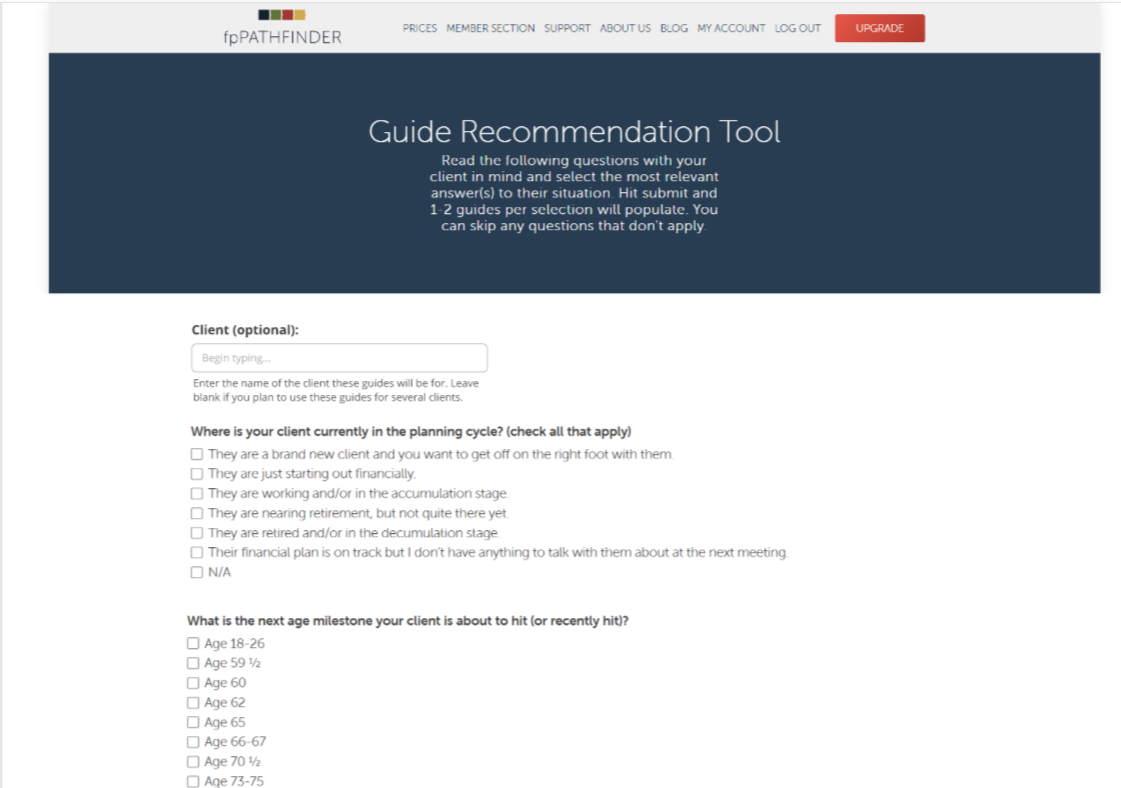
Advisors are able to preview, download, and share the selected guides quickly, streamlining their workflow and ensuring confidence in preparation for each client interaction.
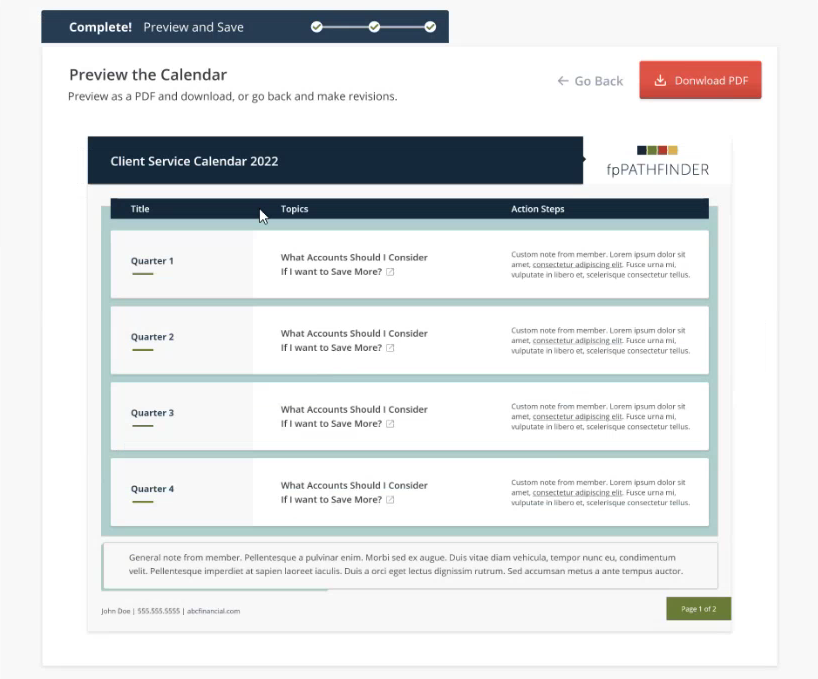
Advisors are able to preview, download, and share the selected guides quickly, streamlining their workflow and ensuring confidence in preparation for each client interaction.

A digital calendar preview displays quarterly client service tasks, with action steps and topics, and options to download as PDF or edit before saving.

Advisors can create customized annual calendars of service touchpoints.

Results

KDG's collaborations with fpPathfinder has delivered clear results:

arrow

Explore More

Related Insights

  • Webinar
    How to Elevate & Evaluate Your Business’s Online Presence
  • Article
    Is Your Microsoft 365 Environment Ready for AI?